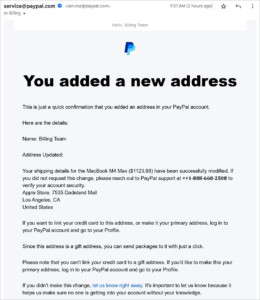
A new form of email fraud, impersonating PayPal, is being deployed by bad actors with increasingly sophisticated scripts. Taking advantage of the user’s anxiety when receiving a notification related to a financial transaction, the scammer sends fake emails in an attempt to trick the victim and entice them to grant remote access to the personal computer.

In recent times, many users have reported receiving a notification email from PayPal with the subject “You added a new address” or “Certify changes to account information.” This email will tell you that a new address has been added to the recipient’s PayPal account and will require you to confirm the information. Notably, there was also an announcement of a high-value purchase, such as a MacBook M4 purchase, and a warning that if a user failed to make this purchase, a ” support ” number should be called immediately to cancel.
To increase reliability, these emails are sent from the address shown as service@paypal.comThis is the email that many people mistook as an official email. Your email should be professionally designed using PayPal’s familiar language and layout, to create a sense of urgency and make the recipient believe his or her account has been hacked. However, if you check carefully, you may find that no new addresses have been added to your account, or that the recipient does not even have a PayPal account.
The main objective of this scam scenario is to scare the victim into believing that the PayPal account has been hacked and to generate unauthorized transactions. When the victim calls the number provided in the email, they will hear a recording requesting to wait to connect with the “support worker.” The scammer then plays the role of a PayPal employee, further scaring the victim of the risk of losing money and persuading the victim to download a “technical support” software from fake websites such as pplassit[.]com. In fact, it’s a remote computer control software that allows scammers to gain access to the victims’ systems, steal personal information, install malicious code, or steal bank accounts.
Experts recommend staying alert for unusual email notifications. If you receive an email from PayPal about a change in address or a purchase that you didn’t make, don’t call the phone number in the email and don ‘t download the software as directed. Instead, actively log in directly to the official PayPal website to check your account status. If no changes are detected, users simply delete or bypass the fake email to avoid undue risk.